Showing posts with label Exchange 2010. Show all posts
Showing posts with label Exchange 2010. Show all posts
Monday, February 24, 2014
create mailbox in exchange 2010 for sub domain user
In root domain controller, insert Exchange 2010 installation CD to d drive then type d:\setup /preparedomain:xxx.yyy.zzz (your sub-domain)

The Name on the security certificate is invalid or does not match the name of the site
In the CAS role of Exchange Server, Open Exchange Management Shell, input the following:
- Set-ClientAccessServer -Identity "servername" –AutodiscoverServiceInternalURI https://owa.exmple.com/autodiscover/autodiscover.xml
- Set-WebServicesVirtualDirectory -Identity "servername\EWS (Default Web Site)" –InternalUrl https://nlb.nwtraders.msft/EWS/Exchange.asmx
- Set-OABVirtualDirectory -Identity “servername\OAB (Default Web Site)” -InternalURL https://owa.exmple.com/OAB
- Enable-OutlookAnywhere -Server servername -ExternalHostname “owa.example.com” -ClientAuthenticationMethod “NTLM”
- Set-ActiveSyncVirtualDirectory -Identity “servername\Microsoft-Server-ActiveSync (Default Web Site)” -InternalURL https://owa.exmple.com/Microsoft-Server-Activesync
Wednesday, July 24, 2013
Unable to open Exchange 2010 Management Console - Initialization Failed
- Open Registry Editor (regedit) as the user you run the EMC under.
- Go to
HKEY_CURRENT_USER\SOFTWARE\Microsoft\ExchangeServer\v14\AdminTools - Look for value NodeStructureSetting.
- If it is there, back it up and then remove it.
Thursday, June 6, 2013
Clear completed move requests on Exchange 2010
Get-MoveRequest -MoveStatus Completed | Remove-MoveRequest
Sunday, September 11, 2011
Exchange Server 2010 & Event ID 106
There is nothing to worry about this error. Microsoft published article KB982679 - Event ID 106 is logged when you start the RPC Client Access service on Exchange Server 2010.
This problem occurs because the performance counters of the RPC Client Access service are not installed when you install only the Mailbox role on an Exchange Server 2010 server. However, this does not affect the functionality of the Exchange Server 2010 server.
It’s not so pretty to see many errors in Event Viewer after restarting Microsoft Exchange RPC Client Access service. Let’s try to manually add RPC Client Access performance counters.
Manually add RPC Client Access performance counters
This problem occurs because the performance counters of the RPC Client Access service are not installed when you install only the Mailbox role on an Exchange Server 2010 server. However, this does not affect the functionality of the Exchange Server 2010 server.
It’s not so pretty to see many errors in Event Viewer after restarting Microsoft Exchange RPC Client Access service. Let’s try to manually add RPC Client Access performance counters.
Manually add RPC Client Access performance counters
- Start Exchange Management Shell
- Add-PSSnapin Microsoft.Exchange.Management.PowerShell.Setup
- New-PerfCounters -DefinitionFileName "C:\Program Files\Microsoft\Exchange Server\V14\Setup\Perf\RpcClientAccessPerformanceCounters.xml"
- Restart server or Microsoft Exchange RPC Client Access service.

Tuesday, July 12, 2011
Add Full Access Right to Exchange 2010 user's mailbox
Get-MailboxDatabase -identity “Mailbox Database” | Add-ADPermission -user “Domain Admins” -AccessRights GenericAll
Friday, July 1, 2011
Exchange EMC report: The WinRM client received an HTTP server error status (500)
1) Launch Server Manager
2) Click Features
3) Selected WinRM IIS Extension to install
2) Click Features
3) Selected WinRM IIS Extension to install
Wednesday, June 29, 2011
Disable MSSTD checkbox in Outlook Anywhere
Set-OutlookProvider EXPR -Server $null -CertPrincipalName none
Friday, June 17, 2011
Delete a disconnected mailbix in Exchange 2010
1. Get-MailboxStatistics -Database "Mailbox Database 1166050598" | Where-Object {$_.DisconnectDate -Notlike $NULL} | FL DisplayName, DisconnectDate, MailboxGuid
2. The result should be
DisplayName : USERMAN
DisconnectDate : 1-7-2010 16:00:48
MailboxGuid : def4aabd-2156-5857-858f-470efc3e6f28
3. Remove-Mailbox -Database "Mailbox Database 1166050598" -StoreMailboxIdentity def4aabd-2156- 5857-858f-470efc3e6f28
4. clean-mailboxdatabase "Mailbox Database 1166050598"
2. The result should be
DisplayName : USERMAN
DisconnectDate : 1-7-2010 16:00:48
MailboxGuid : def4aabd-2156-5857-858f-470efc3e6f28
3. Remove-Mailbox -Database "Mailbox Database 1166050598" -StoreMailboxIdentity def4aabd-2156- 5857-858f-470efc3e6f28
4. clean-mailboxdatabase "Mailbox Database 1166050598"
Sunday, June 12, 2011
Saturday, June 11, 2011
Move mailbox with many bad items
New-MoveRequest -Identity 'Kweku' -PrimaryOnly -TargetDatabase "DB01" -BadItemLimit 100 -AcceptLargeDataLoss
Tuesday, June 7, 2011
Exchange 2010 SP1 Mailbox Import
1. In Role Base Access Control (RBAC), assign Mailbox Import Export Role to administrator
2. Copy the pst file to share file e.g. \\mbx1\temp
3. In Exchange Management Shell, type
New-MailboxImportRequest -Mailbox 'user' -FilePath \\mbx1\temp\user.pst
4. Check the status, type
Get-MailboxImportRequest
2. Copy the pst file to share file e.g. \\mbx1\temp
3. In Exchange Management Shell, type
New-MailboxImportRequest -Mailbox 'user' -FilePath \\mbx1\temp\user.pst
4. Check the status, type
Get-MailboxImportRequest
Saturday, June 4, 2011
Active Sync error with Exchange 2010 Sp1 "Failed to create the account. Please try again later".
ExI have seen this error many times with iPhones, etc. This has been easily fixed every time by simply doing the following.
1. Go Active Directory Users & Computers (Enable Advanced Features if needed)
2. Open the properties of the user that is having the issue
3. Click on the Security Tab
4.Click the Advanced button
5. In the Default Permissions tab check the box at the bottom for "Include inheritable permissions from this object’s parent"
6. Wait for AD to propagate
Saturday, April 16, 2011
Offline Address Book: Mystery of The Missing Recipients
Offline Address Book: Mystery of The Missing Recipients
Frequently users report recipients missing from the GAL. So begins the mystery of missing recipients.
These are existing users, not new ones. New users don’t show up in the GAL for clients using Outlook 2003 Cached Mode clients, because Outlook uses an Offline Address List (aka “Offline Address Book” or OAB), which is generated once every 24 hours by default [read previous post "New user does not show up in GAL"]
In this case there are existing users who did show up in the GAL earlier but have disappeared now.
Scenario:
- Recipients are not hidden from Exchange Address Lists
- Recipients do show up in the “All Users” Address List
- Recipients do show up when Outlook’s not in Cached Mode
- Recipients resolve in Outlook Web Access
Some recipients may not be included in the Offline Address Book when it is generated, for a number of reasons.
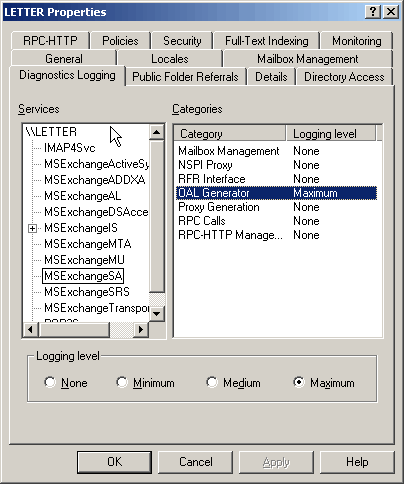
With Diagnostics Logging for OALGenerator bumped up (in server properties | Diagnostics Logging tab | MSExchangeSA -> screenshot), the OAB was regenerated manually. Sure enough, errors were logged for the missing users.
Details:
Event Type: Error
Event Source: MSExchangeSA
Event Category: OAL Generator
Event ID: 9325
Date: 1/30/2007
Time: 3:04:17 PM
User: N/A
Computer: LETTER
Description:
OALGen will skip user entry ‘Joe Adams‘ in address list ‘\Global Address List’ because the SMTP address ” is invalid.
- Default Offline Address List
On closer inspection:
- The reason these recipients show up in the “All Users” Address List is because that Address List is not part of the OAB – only the Default GAL is, as shown in the screenshot below. Therefore, if you disconnect the client from the network, you can’t see the “All Users” Address List.
 - The default SMTP email address of the user – as displayed on the Email Addresses tab with uppercase SMTP: was jadams@exchangelabs.net.

However, on the recipient’s properties | General tab, it showed up as Joe.Adams@exchangelabs.net.

- The address on the General tab was corrected to match the default email address – jadams@exchangelabs.net
- The OAB was regenerated, and complete OAB downloaded in the Outlook client.
Voilà, the missing users showed up!
And thus was solved the mystery of the missing recipients.
These are existing users, not new ones. New users don’t show up in the GAL for clients using Outlook 2003 Cached Mode clients, because Outlook uses an Offline Address List (aka “Offline Address Book” or OAB), which is generated once every 24 hours by default [read previous post "New user does not show up in GAL"]
In this case there are existing users who did show up in the GAL earlier but have disappeared now.
Scenario:
- Recipients are not hidden from Exchange Address Lists
- Recipients do show up in the “All Users” Address List
- Recipients do show up when Outlook’s not in Cached Mode
- Recipients resolve in Outlook Web Access
Some recipients may not be included in the Offline Address Book when it is generated, for a number of reasons.
With Diagnostics Logging for OALGenerator bumped up (in server properties | Diagnostics Logging tab | MSExchangeSA -> screenshot), the OAB was regenerated manually. Sure enough, errors were logged for the missing users.
Details:
Event Type: Error
Event Source: MSExchangeSA
Event Category: OAL Generator
Event ID: 9325
Date: 1/30/2007
Time: 3:04:17 PM
User: N/A
Computer: LETTER
Description:
OALGen will skip user entry ‘Joe Adams‘ in address list ‘\Global Address List’ because the SMTP address ” is invalid.
- Default Offline Address List
On closer inspection:
- The reason these recipients show up in the “All Users” Address List is because that Address List is not part of the OAB – only the Default GAL is, as shown in the screenshot below. Therefore, if you disconnect the client from the network, you can’t see the “All Users” Address List.
- The default SMTP email address of the user – as displayed on the Email Addresses tab with uppercase SMTP: was jadams@exchangelabs.net.However, on the recipient’s properties | General tab, it showed up as Joe.Adams@exchangelabs.net.
- The address on the General tab was corrected to match the default email address – jadams@exchangelabs.net
- The OAB was regenerated, and complete OAB downloaded in the Outlook client.
Voilà, the missing users showed up!
And thus was solved the mystery of the missing recipients.
Subscribe to:
Posts (Atom)
-
Connect to the ESXi host with SSH Stop the USB arbitrator service. This service is used to passthrough USB device from an ESX/ESXi host to...
-
To make changes to this policy for one of the seven default values: Start the Microsoft Management Console. On the Console menu, click Ad...
-
Hyper-V R2 brings some powerful virtualization to the table for those of us who do not have either the skills or the desire to work with vir...